¶ Dynamic Patching
Most patches in Patchworld are made of static, hand-wired connections: you grab an output, drag it onto an input, done. But many gameplay ideas need the set of blocks itself to evolve at runtime - enemies that spawn on the fly, picked-up items, players that join and leave, projectiles that exist only for half a second...
Dynamic patching is the toolkit you reach for when you cannot (or do not want to) hard-wire every reference. It is built around a small family of System blocks that produce, filter and iterate over lists of blocks:
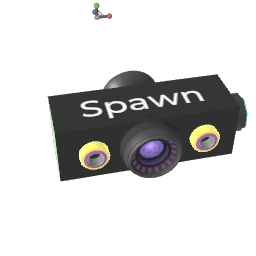 Block Spawn - clone a template block or Device on demand.
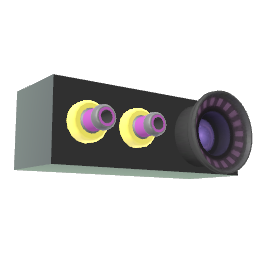 Block Foreach - iterate over a list and re-emit each block one at a time.
 Block Compare - combine, filter, navigate or store lists of blocks.
 Block Remove - destroy blocks (often the ones spawned earlier).
- The Variable family (Set Variable, Get Variable, All With Variable, Remove Variable) - tag blocks at runtime and look them back up.
If you have not read it yet, the Variable System wiki page is the perfect companion to this one: variables are the most common way to "remember" what you spawned and re-find it later.
¶ Mental model
Three building blocks are enough to express most dynamic patches:
- Produce a list - using a Tag output. Examples:
block_spawn's "All copies", Ray Cast's "Hit Results", All With Variable's "Output", Trigger Box's output, etc. - Transform / filter the list - typically with
block_compare(set ops, last/first, parent, grabber...) and / orall_with_variable(filter by value, sort). - Act on each block - feed the resulting list into
block_foreach, then chain the foreach's "Output block" into Tag inputs of blocks like Set Position, Block Set Color, Set Scale,set_variable,block_remove, etc. Use the "Index" jolt output to drive per-instance variation.
Tip: drop a Get Name Text anywhere on a Tag output you suspect is wrong - it prints the block names of whatever is currently passing through, which is the easiest way to debug a dynamic patch.
¶ Pattern: Spawn + Foreach (the duo)
block_spawn and block_foreach are designed to work together. The spawn block already exposes its instances on the "All copies" tag output, so it plugs straight into a foreach Input.
A minimal "spawn 10 cubes in a row" patch:
[ trigger ] -- 10 ---> [ block_spawn ] -- All copies ---> [ block_foreach ]
                              ^                                  |
                              |                                  | Output block
              [ template:cube prefab ]                           v
                                                          [ block_set_position ]
                              [ block_foreach.Index ] --> X knob (or via Math)
Steps:
- Connect a "cube" template to
block_spawn's "Template to spawn". - Send a jolt of value 10 into Spawn's "Spawn" input - 10 copies appear at the Spawn position part.
- The "All copies" tag output now references those 10 blocks. Plug it into a
block_foreach. - The foreach is in automatic mode by default ("Trigger Automatically" ON), so it re-runs every time a new copy arrives.
- The foreach's "Output block" tag output points to one block at a time; connect it to a
block_set_positionTarget. - Use the foreach's "Index" jolt output, optionally through a Math Stream or Map Jolt block, to feed the X knob of
block_set_position. Each cube ends up at a different X.
With this pattern, anything you connect downstream (color, scale, variables) is applied per-copy without ever touching the spawned blocks by hand.
¶ Pattern: Tag spawned content with Variables
A better, more decoupled version of the same idea is to tag spawned blocks with a variable and let the rest of the patch react to the tag, not to the spawn block itself:
[ block_spawn ] -- All copies --> [ set_variable "IsEnemy" = 1 ] (Input)

[ all_with_variable "IsEnemy" ] -- Output --> [ block_foreach ] --> ...gameplay...
Why this is nice:
- Anything that kills an enemy can also
remove_variable "IsEnemy", and the foreach automatically forgets it. - Multiple spawn blocks can feed the same tag without you wiring them all into the same foreach.
- You can use
all_with_variable's Value Filter and Order in output to build leaderboards or priority queues for free.
See Variable System for the full details.
¶ Pattern: Find blocks dynamically with Raycast / Trigger Box
block_spawn is one source of dynamic blocks; detection is another. Ray Cast outputs the blocks its ray hits, Trigger Box outputs blocks entering a region, Block Compare with Grabber outputs the controller currently holding a block. All of these produce live lists you can plug into a foreach or store with block_compare "Store".
Example: damage every block hit by a sphere cast.
[ raycast (Continuous, thickness > 0) ] -- Hit Results --> [ block_foreach ] --> [ set_variable "HP" -= 1 (additive) ]
¶ Pattern: Compare two lists ("what changed?")
block_compare shines when you need to know what differs between two lists.
Common combinations:
A-Bwith A = "current frame raycast hits" and B = "previous frame hits stored in a Store-mode block_compare" gives you the newly entered blocks.Sharedbetween two raycasts coming from each hand tells you which block is grabbed by both hands.==between an All With Variable result and a hand-picked Tag input fires a single jolt when "everything is collected".Last/Firstare the simplest way to pick a single block out of a dynamic list (e.g. the most recent hit).Device/Parentlet you escalate from a clicked sub-part to the surrounding Device, which is the unit you usually want to act on (e.g. respawn the whole rifle, not just one of its sub-parts).Grabbermaps a list of grabbed blocks to the controllers grabbing them - perfect for haptics or scoring "who picked what first".Storekeeps an accumulating list as A flickers; combine with theClearjolt to reset.Indexuses the Manual Trigger jolt value as an index into A; great in combination with a Counter or with ablock_foreach's Index output.
¶ Pattern: Cleanup with block_remove
Anything you spawn dynamically should usually be removed at some point - either when a condition is met (player dies, level ends) or after a delay.
Two approaches:
- Lifetime on spawn - set the "Life time of copies" knob on
block_spawnbefore triggering. Patchworld auto-destroys each copy after N seconds. Simplest, no extra wiring. - Manual removal - feed any Tag output (block_spawn's "All copies",
all_with_variable, raycast hits...) intoblock_remove's Input, then fire the Remove jolt. Useful when removal depends on gameplay events rather than time.
When the blocks you spawned are full Devices (e.g. a Group containing a body + colliders + behaviour), tick Use Device on Input on block_remove, otherwise only the connected sub-block is removed and you leak the surrounding Device.
¶ Pattern: Communicating between dynamically spawned blocks
Inside a freshly-spawned Group/Device you often want behaviour that talks back to the rest of the world (e.g. "this enemy reports being killed"). Two complementary tools:
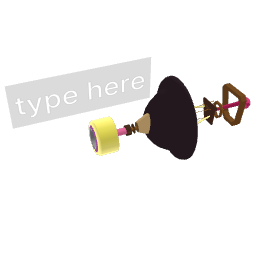 Send Jolt inside the spawned Device, paired with a Receive Jolt outside, lets you broadcast jolts without wiring (channel name + optional channel ID).
 Set Variable with Add restriction input scopes a variable to the spawned Device, so each instance keeps its own copy of
 LastHit,HP,Owner, etc., even with the same variable name.
The two patterns combine well: a spawned enemy uses set_variable for per-instance state and wireless_out_jolt for global "I died" notifications.
¶ Pattern: Spawn from a TextInput command
block_spawn has an inspector option "Use TextInput as spawn command". When ON, instead of cloning the connected template block, it reads the text on a Txt (or any block exposing a TextInput) connected to the template input and treats it as one of:
- a block name (like in the in-world console:
oscillator,make_physical,block_set_position...), - a 24-character hex asset id (Mongo-style ids returned by the Library),
- a full mux command (e.g.
spawn mesh src:"https://...").
Combine with a Contain Text to dispatch on user-typed strings, or with Join & Apply Text to assemble a command from several sources. This is how asset-library-style patches work without leaving the world.
¶ Debugging dynamic patches
Dynamic patches are notoriously harder to debug than static ones because the wires you see in the editor are not the whole picture. A few habits help a lot:
- Drop a Get Name Text on every Tag output you are unsure about. It outputs the names (or asset ids/paths via its inspector dropdown) of the blocks currently flowing through, which makes invisible references visible.
- Watch counts.
block_compare's "Output Count" andall_with_variable's "Count" jolt outputs re-fire whenever the lists change; route them into a Number Readout or Number to see the size live. - Use Manual Trigger to slow things down. Most System blocks (foreach, compare, set/get/all_with_variable, contain_text) auto-trigger by default. Wiring a manual jolt input lets you re-evaluate on demand and step through the logic.
- Limit recursion. Foreach has "Limit To Once a Frame" for a reason - if the foreach feeds a block that ends up changing the foreach's input, you want this on.
- Check Restrict scopes. When variables seem to "not exist", make sure both the writer and the reader use the same Restrict input (or none at all). The variable name is rendered red on a block when it is currently restricted, see the Variable System page.
¶ Cheat sheet
| Need | Block | Thumbnail |
|---|---|---|
| Clone a block / Device on demand | Block Spawn | |
| Iterate over a list of blocks | Block Foreach | |
| Filter / combine / navigate lists | Block Compare | |
| Destroy blocks (with optional delay) | Block Remove | |
| Tag blocks at runtime | Set Variable | |
| Read a tag from a block | Get Variable |  |
| List every block with a tag | All With Variable |  |
| Detect blocks via collisions / vision | Ray Cast, Trigger Box |  |
| Send jolts without wires | Send Jolt, Receive Jolt | |
| Build / dispatch text commands | Txt, Contain Text, Join & Apply Text |  |
| Debug a Tag output | Get Name Text |  |
| Conditionally pass or block a Tag connection | Tag Gate |  |
¶ Pattern: Conditional Tag connections with Tag Gate
Tag Gate sits between a Tag source and a Tag destination. When the gate is On the reference passes through; when Off the downstream block sees an empty list.
[ all_with_variable "Enemy" ] --> [ Tag Gate ] --> [ block_foreach ] --> [ Set Scale ]
                                      ^
                            [ metronome / compare output ]
This is useful when you want to temporarily suspend an effect without cutting the wires — for example, freezing all enemies while a cutscene plays, or toggling an entire gameplay system on/off with a single jolt. Combine with a Gate (jolt version) for the equivalent control over Jolt signals.