¶ Block Spawn
Category: ⚙️ System
¶ Description
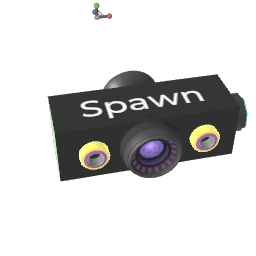
Connect a block or device to the "Template to spawn" tag input, then trigger the Spawn jolt with the number of copies you want. Each new instance appears at the Spawn Position movable part and is also re-emitted through the "All copies" tag output.
Block Spawn clones whatever is connected to its template input (a single block, or a whole Group/Device with all its inner connections). The clones are placed at the position and rotation of the second movable part ("Spawn position"), so move that part with VR Grab to control where new copies appear.
All spawned copies are exposed via the "All copies" tag output, which makes it easy to chain a block_foreach right after to apply per-instance logic (Set Position, Set Color, Set Variable...). The optional Life time dial automatically removes copies after N seconds; -1 keeps them forever. The Clear all jolt removes every copy at once.
In multiplayer, the "Synced By" inspector dropdown decides which player is allowed to spawn (Room Master, Closest Player or Everybody). With "Use TextInput as spawn command" enabled, the block reads the text on a connected txt (or any TextInput) as a block name, asset id or full mux command instead of cloning it, which is handy for asset libraries.
See the Dynamic Patching wiki page for full patterns.
¶ Related Wiki Pages
dynamic-patching • variable-system
¶ Inputs, Outputs and Parts
¶ Inputs
| Name | Type | Description |
|---|---|---|
| Template to spawn | Tag Input | Block or Device to clone. The full hierarchy and inner connections are preserved on each copy. |
| Spawn | Jolt Input | Triggers a spawn. The jolt value is the number of new instances to create (must be > 0). |
| Clear all | Jolt Input | Removes every copy this Spawn block has created. |
| Life time of copies | Jolt Input with Dial | Auto-remove each copy after this many seconds. Set before triggering Spawn. -1 keeps copies permanent. |
¶ Outputs
| Name | Type | Description |
|---|---|---|
| All copies | Tag Output | Tag output that references every block this Spawn block has created so far. Connect it to a block_foreach to act on each instance, or to block_compare / set_variable for tagging. |
¶ Others
| Name | Type | Description |
|---|---|---|
| Spawn position | Sub Part | Second movable part of the block. New copies appear at this part's position and rotation, so grab and move it to control where they show up. |
¶ Inspector Controls
| Name | Type | Description |
|---|---|---|
| Synced By | dropdown | Decides which player is allowed to actually spawn the copies in multiplayer (other players just receive the result). "Room Master" centralizes spawning on the host; "Closest Player" picks the player nearest to this block; "Everybody" lets any player spawn (use carefully to avoid duplicate spawns). |
| Spawn In Group | checkbox | Only available when this Spawn block is itself inside a Group/Device. When ON, new copies are placed inside the same parent Group instead of at the world root. |
| Use TextInput as spawn command | checkbox | When ON, instead of cloning the connected template block, Spawn reads the text on its TextInput (e.g. a txt block connected to the template input) and treats it as a block name, asset id (24-char hex) or full mux command. Useful for asset libraries and remote spawning. |