¶ Block Set Color
Category: 🎨 Visual
¶ Description
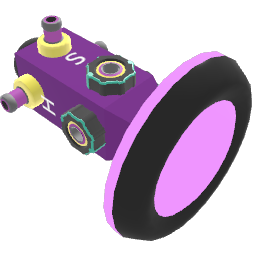
Changes the color of the targeted blocks using HSV controls (Hue, Saturation, Brightness). Connect blocks to the Tag input, then adjust the knobs or pick a color from the 3D color picker.
Color manipulation tool with HSV controls. Connect any paintable blocks to the Tag input and modify their color in real time using the dedicated knobs (each takes a 0-1 value) or the integrated color picker. The Hue, Saturation and Brightness Jolt outputs forward the current values, which is useful for chaining color logic across blocks.
¶ Inputs, Outputs and Parts
¶ Inputs
| Name | Type | Description |
|---|---|---|
| Target | Tag Input | Block(s) whose color will be changed. |
| Hue | Jolt Input with Dial | Hue component of the color (0-1 range, wraps around the color wheel). |
| Saturation | Jolt Input with Dial | Saturation component of the color (0: grayscale, 1: fully saturated). |
| Brightness | Jolt Input with Dial | Brightness/Value component of the color (0: black, 1: maximum brightness). |
¶ Outputs
| Name | Type | Description |
|---|---|---|
| Hue out | Jolt Output | Forwards the current hue value when it changes. |
| Saturation out | Jolt Output | Forwards the current saturation value when it changes. |
| Brightness out | Jolt Output | Forwards the current brightness value when it changes. |
¶ Others
| Name | Type | Description |
|---|---|---|
| Color picker | Interactible | 3D color picker. Move the diamond to set the color directly. |
¶ Inspector Controls
| Name | Type | Description |
|---|---|---|
| Show button only | toggle | Hides the HSV knobs and only shows the 3D color picker, for a more compact look. |