¶ Preset Manager
Category: ⚙️ System
¶ Description
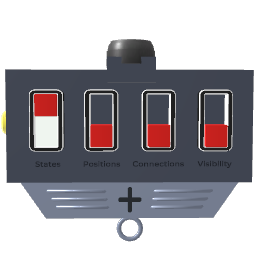
Saves and recalls snapshots (presets) of connected blocks' states, positions, connections, and visibility. Drag blocks onto it to include them, then add preset rows and apply them to restore saved configurations.
Each preset stores a snapshot of all connected blocks. Toggle the four restore switches to control what gets recalled when a preset is applied: parameter values/states, position/rotation, wire connections, and visibility. Automate preset switching by combining the Preset Select and Preset Operation jolt inputs: send the target index to Preset Select, then an operation code to Preset Operation (0 = apply, 1 = overwrite with current states, 2 = delete).
¶ Related Wiki Pages
¶ Inputs, Outputs and Parts
¶ Inputs
| Name | Type | Description |
|---|---|---|
| Transition Time | Stream Input | Duration in seconds to interpolate to the preset position when a preset is applied. 0 means instant. |
| Transition Time | Jolt Input with Dial | Duration in seconds to interpolate to the preset position when a preset is applied. 0 means instant. |
| Add Blocks | Tag Input | Drag this handle onto blocks to include them in all presets managed by this block. |
| Preset Select | Jolt Input | Set the index (0-based) of the preset to target with the next Preset Operation jolt. |
| Preset Operation | Jolt Input | Trigger an operation on the preset at the current Preset Select index. 0: apply the preset to connected blocks. 1: write (overwrite) the preset with current states. 2: delete the preset. |
¶ Others
| Name | Type | Description |
|---|---|---|
| Restore Values | Toggle Button | When on, restores the parameter values and states of connected blocks when a preset is applied. |
| Restore Position | Toggle Button | When on, restores the position and rotation of connected blocks when a preset is applied. |
| Restore Connections | Toggle Button | When on, restores the wire connections of connected blocks when a preset is applied. |
| Restore Visibility | Toggle Button | When on, restores the visibility state of connected blocks when a preset is applied. |
| Add/Remove Preset | Interactible | Click to add a new preset row. Drag downward to add multiple rows at once, drag upward to remove rows. |