¶ Snapshot
Category: 🎨 Visual
¶ Description
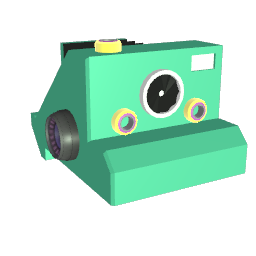
An in-world camera that renders to a texture. Connect it to image blocks to display a live feed, or save still 2D / 360° pictures into your library.
Set the resolution and ratio in the inspector, or pick Custom and enter exact pixel dimensions. Mode picks the projection (Classic perspective, 360° equirectangular, or Orthographic). The 'Render' jolt re-renders into the texture on demand (handy when Framerate is 0). 'Save' renders then writes a PNG into your image library and spawns an Image block holding it. Connect an Image block via the Tag input to mirror the live render into it as a texture.
¶ Inputs, Outputs and Parts
¶ Inputs
| Name | Type | Description |
|---|---|---|
| Image target | Tag Input | Connect an Image block here to mirror the camera's live render into it as a texture. |
| Render | Jolt Input | Trigger a single render into the camera's texture. Most useful when Framerate is set to 0 (manual mode). |
| Save | Jolt Input | Render once, save the result as a PNG in your image library, and spawn an Image block holding it. |
| Field of view | Jolt Input | Sets the camera FOV in degrees (1-179 in Classic mode, 0-5 size in Orthographic). |
| Projection mode | Jolt Input | Switch projection: 0 = Classic (perspective), 1 = 360 (equirectangular cubemap), 2 = Orthographic. |
¶ Others
| Name | Type | Description |
|---|---|---|
| Grab | Sub Part | Grab here to move the snapshot block. Point it at whatever you want to render. |
¶ Inspector Controls
| Name | Type | Description |
|---|---|---|
| Format ratio | dropdown | Aspect ratio of the render. Custom unlocks the Width/Height text fields below. |
| Resolution | dropdown | Vertical resolution in pixels. 3240 is flagged with a warning - heavy on memory and may stall on Quest. |
| Width (px) | text_input | Custom width in pixels (only used when Format ratio or Resolution is Custom). |
| Height (px) | text_input | Custom height in pixels (only used when Format ratio or Resolution is Custom). |
| Mode | dropdown | Camera projection. 'Classic' = standard perspective. '360' = equirectangular cubemap suitable for VR skyboxes. 'Orthographic' = no perspective. |
| Field of view | slider | FOV in degrees (Classic mode) or orthographic size (Orthographic mode). |
| Pixellated | toggle | Use point filtering for a sharp, pixelated look (good for low-resolution retro renders). |
| Transparent | toggle | Renders with a transparent background instead of the world color (PNG alpha is preserved when saving). |
| Framerate | slider | How many times per second the camera re-renders into the texture. Set to 0 to disable automatic rendering and only render on demand via the 'Render' input. |
| Depth Mode | toggle | Enables Depth rendering. The camera renders object distances from the lens in grayscale instead of color. Transparent objects are ignored. |
| Black Distance (m) | text_input | The distance from the camera (in meters) where the depth map will be perfectly black. |
| White Distance (m) | text_input | The distance from the camera (in meters) where the depth map will be perfectly white. |