¶ Piston
Category: 🚀 Motion
¶ Description
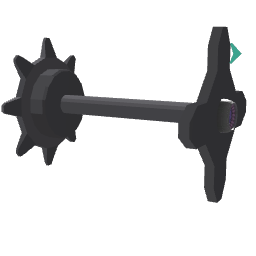
Attach two blocks together with a linear constraint and control the distance between them. Useful to make suspensions, pistons, springs, etc.
- Place this piston inside a physical group.
- Connect the Tag input to a different group (or block).
Both groups will be subject to the constraint.
Activate features from the Inspector.
The Piston block creates a configurable linear (translation) link between two rigidbodies along its forward axis. Once placed inside a physical group and connected to another part via the Tag input, both parts become attached and slide along the joint axis.
Force, distance limit and outputs are not built-in: they are added as sub-blocks via the Inspector checkboxes (joint_piston, joint_piston_limit, joint_piston_output) that automatically attach to the Piston's panel.
For rotational constraints, use the Joint block instead.
¶ Related Wiki Pages
¶ Inputs, Outputs and Parts
¶ Inputs
| Name | Type | Description |
|---|---|---|
| Connected Block | Tag Input | Block or group attached to the piston. Will automatically become physical if no "Make Physical" block is used. Only one block or group can be connected at a time. |
¶ Others
| Name | Type | Description |
|---|---|---|
| Piston Size | Draggable part | Drag to resize the visual shaft of the piston. Only affects visuals, not the physics behavior. |
¶ Inspector Controls
| Name | Type | Description |
|---|---|---|
| Force & Position | checkbox | When ON, spawns and attaches a joint_piston sub-block to drive the linear movement (spring, inertia, target position, target velocity). |
| Distance Limit | checkbox | When ON, spawns and attaches a joint_piston_limit sub-block to constrain the slide range. |
| Outputs | checkbox | When ON, spawns and attaches a joint_piston_output sub-block to emit current position and speed as jolts. |
| Hide Controller | checkbox | When ON, hides the player's controller model while grabbing the connected part. |
| Movement Strength | slider | How strongly the connected part follows the controller's position when grabbed (0-10). |
| Rotation Strength | slider | How strongly the connected part follows the controller's rotation when grabbed (0-10). |
| Lock Size | checkbox | Locks the resize handle so the visual shaft size cannot be changed. |