¶ Make Physical
Category: 🚀 Motion
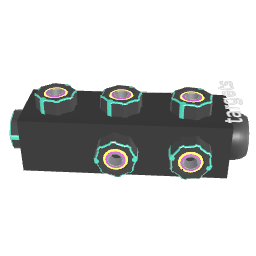
¶ Description
Make connected blocks physical: they can collide, be thrown, fall under gravity and react to forces. Exposes mass, drag, friction, bounciness and a magnetic force.
Convert connected blocks into rigidbodies so they can collide with each other, be thrown by the player, fall under gravity and react to other physics blocks like Thruster, Field, Wing, Joint or Piston.
- Mass affects how blocks push each other on collision and how they react to forces.
- Drag and Rotation Drag continuously slow down linear and angular motion.
- Magnet Force attracts blocks with a positive magnet value (and repels those with a negative one); two zero values produce no effect.
- Bounciness and Friction control surface response. The Inspector lets you choose how the two materials are combined (Average, Multiply, Minimum, Maximum).
Useful for vehicles, ragdolls, dominoes, balls, cannons, breakable structures, etc. Pair with Make Physical Extra for runtime controls (freeze, kill velocity, reset).
¶ Related Wiki Pages
¶ Inputs, Outputs and Parts
¶ Inputs
| Name | Type | Description |
|---|---|---|
| Physic objects | Tag Input | Click and drag to a block to make it physical. |
| Mass (kg) | Jolt Input with Dial | Mass of the rigidbody, in kilograms. Affects how strongly the block pushes others on collision and how forces accelerate it. |
| Drag | Jolt Input with Dial | Continuously slows down the linear velocity of the block. Higher values make the block lose speed faster (acts like air friction). |
| Rotation Drag | Jolt Input with Dial | Continuously slows down the rotation of the block. |
| Magnet Force | Jolt Input with Dial | Attracts other blocks that also have a positive Magnet Force, and repels blocks with a negative one. The pulling force decreases with distance squared. |
| Bounciness | Jolt Input with Dial | 0-1 value controlling how much the block bounces when colliding with others. The value of both colliding blocks is combined according to the Inspector's Bounciness Behavior. |
| Friction | Jolt Input with Dial | Surface friction (0 to infinity). The value of both colliding blocks is combined according to the Inspector's Friction Behavior. |
| Gravity | Jolt Input | 0: no gravity, 1: gravity is applied to the block. |
¶ Others
| Name | Type | Description |
|---|---|---|
| Gravity | Toggle Button | Toggle gravity on the connected blocks. |
¶ Inspector Controls
| Name | Type | Description |
|---|---|---|
| Is Static | checkbox | When ON, the block becomes a static (kinematic) body: it can collide with others but is never moved by physics. |
| Throwable | checkbox | When ON, the block keeps the velocity of the controller when released, allowing it to be thrown. |
| Good Quality Physic | checkbox | Switch to continuous collision detection. More accurate (no tunneling for fast objects) but more expensive. |
| Friction Behavior | dropdown | How the friction of two colliding blocks is combined into one effective value. |
| Bounciness Behavior | dropdown | How the bounciness of two colliding blocks is combined into one effective value. |
| Affects Player | checkbox | When ON, the local player is automatically added to the connected blocks and is affected by the same physics settings (gravity, drag, magnet, etc.). |
| MP Sync Interval | slider | In multiplayer, this defines the base time interval (in seconds) between network physics updates. Lower values provide smoother sync for fast-moving objects but use more bandwidth, while higher values save bandwidth. |