¶ Joint & Piston System
The Joint and Piston blocks are physical connectors that link two rigidbodies together and constrain their relative motion. They are the foundation for building robotic arms, wheels, joysticks, suspensions, sliders, doors, hinges, and any other articulated machinery in Patchworld.
Both blocks share the same underlying script (Physics_Joint) but expose different default behaviors:
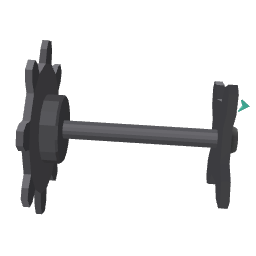 Joint constrains rotation between two parts (rotational/angular link).
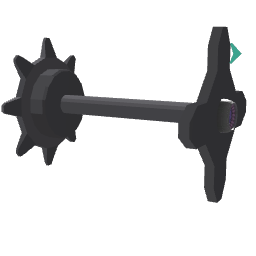 Piston constrains translation between two parts (linear/sliding link).
By default, neither degree of freedom nor limit is active. You enable specific behaviors by ticking checkboxes in the joint's Inspector, which automatically spawn dedicated sub-blocks that snap onto the joint's panel.
¶ How to use
- Spawn a Joint (for rotation) or a Piston (for translation).
- Place the joint inside a physical group (or it will request its own physics).
- Connect the joint's Tag input to a different group or block. The connected part automatically becomes physical even without a Make Physical block.
- Open the joint's Inspector and tick the features you need. Each tick spawns a sub-block:
- On a Joint: degrees of freedom for rotation (XY axis = direction, Z axis = roll), angle limits, and outputs.
- On a Piston: force & position drive, distance limit, and outputs.
- Tweak the dials on each sub-block to drive the constraint as desired.
¶ Sub-blocks
Added via the Joint/Piston's Inspector.
Sub-blocks are auto-attached to the parent joint's panel and forced to follow it; you cannot move them independently. Removing them from the panel via the Inspector unticks the corresponding feature.
¶ Drive (rotation - Joint)
 Joint Direction Control: drives the heading and elevation axes (red and green) toward target angles or velocities, with spring/damper.
 Joint Roll Control: drives the roll axis (blue / Z) toward a target angle or velocity, with spring/damper.
¶ Drive (translation - Piston)
 Joint Piston Control: drives the linear slide along the piston axis toward a target position or speed, with spring/damper.
¶ Limit
Each limit sub-block has a Mode toggle:
- Springy mode: when the joint reaches the limit, a spring/damper pushes it back inside the allowed range.
- Hard mode: the joint hits the limit instantly and bounces back according to a Bounciness value.
Available limit blocks:
 Joint Direction Limit: symmetric heading/elevation angle bounds.
 Joint Roll Limit: low/high roll angle bounds.
 Joint Piston Limit: maximum slide distance.
¶ Output
Output sub-blocks emit the current state of the constraint as jolts every frame.
 Joint Direction Output: heading/elevation angle and angular speed.
 Joint Roll Output: roll angle and angular speed.
 Joint Piston Output: linear position and speed.
¶ Drive vs Velocity behavior
For all drive sub-blocks, the rule of thumb is:
- To reach a specific position: set a non-zero Spring and feed a Target Position. Inertia/Damper prevents oscillations.
- To move at a continuous speed: set Spring to 0, set a non-zero Inertia, and feed a Target Velocity.
Mixing both can produce realistic motor / spring behaviors.
¶ Grab behavior
Both Joint and Piston expose grab settings in their Inspector that affect how the connected part behaves when the player grabs it:
- Hide Controller: hides the player's controller model while grabbing.
- Movement Strength / Rotation Strength: how strongly the connected part follows the player's hand position and rotation.
These settings are useful to make grabbable joysticks, levers, doors and other interactive controls feel right in VR.
¶ Related blocks
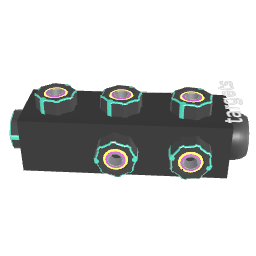 Make Physical: manually mark blocks as physical (mass, drag, gravity, etc).