¶ Numpad
Category: 🎚️ Interfaces
¶ Description
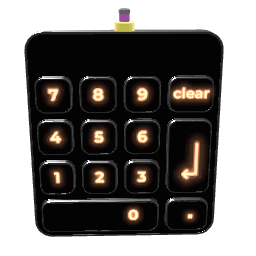
Numeric keypad. Tap the digits to compose a number, then tap Enter to emit it from the jolt output.
A traditional numeric input panel. Use the digit buttons and the decimal point to compose a value (up to 10 characters), Clear to start over, and Enter to emit the parsed value as a jolt. The entered text is preserved across save/reload.
¶ Inputs, Outputs and Parts
¶ Outputs
| Name | Type | Description |
|---|---|---|
| Number Out | Jolt Output | Emits the entered number when Enter is pressed. |
¶ Others
| Name | Type | Description |
|---|---|---|
| Enter | Button | Parses the displayed text and emits it on the Number Out. |
| Clear | Button | Clears the currently displayed text. |
| Point | Button | Inserts a decimal point. Only one decimal point per number is allowed (further presses move it). |
| Zero | Button | Appends a 0 to the entered number. |