¶ Dial
Category: 🎚️ Interfaces
¶ Description
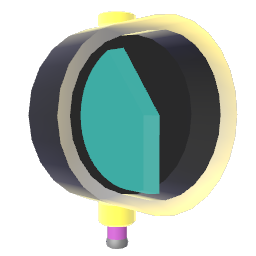
Click & drag up/down, click & twist your hand left/right, or use the joystick up/down to change the position of the dial and output its value on a 0 to 1 range through the Jolt output.
Used for controlling parameters of other blocks and devices (i.e. volume).
Behavior and min/max values can be adjusted from the inspector.
¶ Inputs, Outputs and Parts
¶ Inputs
| Name | Type | Description |
|---|---|---|
| Set & Trigger | Jolt Input | Receives 0 to 1 to set the position of the dial and output that position's value. Can be used to map 0-1 to other value ranges. To connect another block here, click & pull on any Jolt output to create a wire and drag it here. |
¶ Outputs
| Name | Type | Description |
|---|---|---|
| Dial Out | Jolt Output | Outputs the current position of the dial when it changes (default 0 to 1, remapped by min/max/exponential inspector settings). Click & pull to generate a new Jolt wire. |
¶ Inspector Controls
| Name | Type | Description |
|---|---|---|
| Minimum | text_input | The output value when the dial is at its lowest position. |
| Maximum | text_input | The output value when the dial is at its highest position. |
| Exponential | checkbox | When enabled, the mapping from dial position to output value follows an exponential curve instead of linear. Useful for parameters like frequency or volume. |
| Fill From | dropdown | Where the indicator fill starts from: 'Left' fills from the minimum, 'Middle' fills outward from the centre (useful for bipolar parameters), 'Right' fills from the maximum. |
| Colorize | dropdown | Which part of the dial gets colorized when changing the block color. |
| Hide Body | checkbox | Hides the body of the dial, leaving only the indicator visible. |