¶ Knob Num
Category: 🎚️ Interfaces
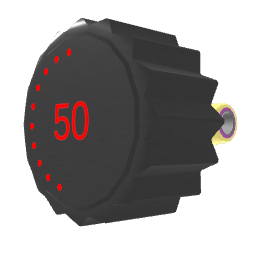
¶ Description
Numeric knob that emits a jolt whenever its value changes. Click and drag up/down, or twist your hand while clicking, to change the value (default range 0 to 1).
Used to control parameters of other blocks and devices (volume, frequency, scale, etc.). The output range and curve are configurable in the inspector (Minimum, Maximum, Exponential), letting you map the knob's full sweep to any numeric range.
¶ Inputs, Outputs and Parts
¶ Inputs
| Name | Type | Description |
|---|---|---|
| Set & Trigger | Jolt Input | Receives a value (in the 0-1 range), sets the knob to that position, and re-emits the mapped value on the Output. Useful for remapping a 0-1 signal to the configured min/max range. |
¶ Outputs
| Name | Type | Description |
|---|---|---|
| Output | Jolt Output | Emits the knob's current value as a jolt whenever it changes. Click & pull to create a wire to another block. |
¶ Inspector Controls
| Name | Type | Description |
|---|---|---|
| Minimum | text_input | Value emitted when the knob is at its lowest position. |
| Maximum | text_input | Value emitted when the knob is at its highest position. |
| Exponential | checkbox | When on, the knob applies an exponential curve so the Midpoint value is reached when the knob is at 50%. When off, the mapping is linear and the midpoint is automatically (min+max)/2. |