¶ Bubble Recorder
Category: 🔊 Audio
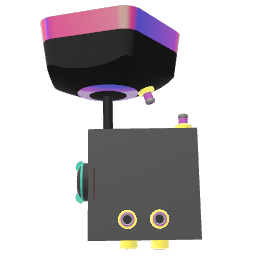
¶ Description
Records audio from a stream input into a Bubble sample. Automatically creates a new Bubble if the receptacle is empty.
¶ Related Wiki Pages
¶ Inputs, Outputs and Parts
¶ Inputs
| Name | Type | Description |
|---|---|---|
| Record | Jolt Input | Send a jolt to start recording (from the begin point). |
| Stop | Jolt Input | Send a jolt to stop recording. |
| Set begin time | Jolt Input | Sets the point to start recording from (in seconds). |
| Set end time | Jolt Input | Sets the point that will trigger 'Recording end' to fire (in seconds). Recording will always continue until a jolt is received through 'Stop'. To stop at this point make a connection from 'Recording end' to 'Stop'. |
| Audio input | Stream Input | Input for the audio to record. |
| Load Bubble | Tag Input | Drag a bubble here to select it as the recording target (requires Show Bubble Selector to be enabled in inspector). |
¶ Outputs
| Name | Type | Description |
|---|---|---|
| Recording end | Jolt Output | Emits a jolt when the recording passes the end point. |
| Bubble placed | Jolt Output | Emits a jolt with value 1 when a bubble is placed and value 0 when a bubble is removed. |
¶ Others
| Name | Type | Description |
|---|---|---|
| Receptacle | Sub Part | Place a bubble here to record into it. |
| Record cursor | Interactible | Shows what part of the sample is being recorded to. |
| Begin time | Interactible | Shows where recording will begin. Grab to move. |
| End time | Interactible | Shows where a jolt will be emitted through 'Recording end'. Grab to move. |
¶ Inspector Controls
| Name | Type | Description |
|---|---|---|
| Synced By | dropdown | Controls which player owns and syncs this recorder in multiplayer sessions. |
| Show Bubble Selector | checkbox | Shows a bubble selector panel for choosing which sample to record into. |