¶ Procedural Line
Category: 🎨 Visual
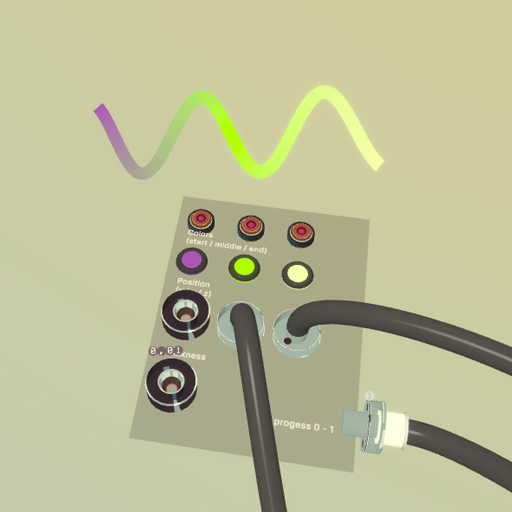
¶ Description
Creates dynamic lines with programmable curvature, thickness, and color along the 0-1 progress. Ideal for audio visualization and custom graphics.
Advanced line rendering system that generates lines with customizable properties at each point along its length. Control curvature, thickness, and color based on the line's 0-1 progress parameter. Perfect for audio visualization when combined with Stream Capture blocks to feed real-time audio data into the line parameters. Creates smooth, procedural graphics with fine-grained control. Start by connecting the "Line Progress" output to the Position X input.
¶ Inputs, Outputs and Parts
¶ Inputs
| Name | Type | Description |
|---|---|---|
| Position X | Stream Input | Stream input controlling X coordinate along the line (0-1 progress) |
| Position Y | Stream Input | Stream input controlling Y coordinate along the line (0-1 progress) |
| Position Z | Stream Input | Stream input controlling Z coordinate along the line (0-1 progress) |
| Thickness | Stream Input | Stream input controlling line thickness (0-1 progress) |
| Color A Position | Jolt Input with Dial | Used to make a quick gradient over the line. Set the position (0-1) of the color A here. |
| Color B Position | Jolt Input with Dial | Used to make a quick gradient over the line. Set the position (0-1) of the color B here. |
| Color C Position | Jolt Input with Dial | Used to make a quick gradient over the line. Set the position (0-1) of the color C here. |
| Color Hue | Stream Input | Process the color yourself for each segment of the line. |
| Color Saturation | Stream Input | Process the color yourself for each segment of the line. |
| Color Value | Stream Input | Process the color yourself for each segment of the line. |
| Crop Start | Jolt Input with Dial | 0-1 value. Hides everything before this point along the line. |
| Crop End | Jolt Input with Dial | 0-1 value. Hides everything after this point along the line. |
¶ Outputs
| Name | Type | Description |
|---|---|---|
| Line Progress | Stream Output | Outputs current progress along the line (0-1 ramp) |
¶ Others
| Name | Type | Description |
|---|---|---|
| Color A | Interactible | First gradient color. Pick a color and place it on the line via 'Color A Position'. |
| Color B | Interactible | Second gradient color, placed at the position set by 'Color B Position'. |
| Color C | Interactible | Third gradient color, placed at the position set by 'Color C Position'. |
| Line | Sub Part | The rendered line mesh. Grab to move it around (its position is independent of the control panel). |
¶ Inspector Controls
| Name | Type | Description |
|---|---|---|
| Face Direction | dropdown | Which way the line's flat ribbon faces. 'Player' = always faces the camera (billboarded). X/Y/Z = locked to a world axis. |
¶ Related Blocks
- stream_capture
- oscilloscope (link not available)
- spectrum_capture