¶ Mixed Reality
Category: 🎨 Visual
¶ Description
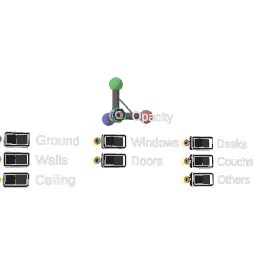
Enables Mixed Reality so you can see the real world around you using your room setup. Toggles let you choose which detected furniture (ground, walls, ceiling, doors, etc.) is visible.
Activates passthrough and mixed reality on Quest devices that have Scene/Room setup. Each toggle controls the visibility of a specific furniture category, letting you mix virtual content with selected real-world surfaces. Pair with magic_window or magic_spotlight to reveal the virtual scene through walls or spot lights. The Opacity dial fades the passthrough between full virtual and full real world.
¶ Inputs, Outputs and Parts
¶ Inputs
| Name | Type | Description |
|---|---|---|
| Opacity | Jolt Input with Dial | Sets the passthrough opacity. 0 = fully virtual, 1 = fully real world. |
| Ground | Jolt Input | Toggle visibility of the detected floor (1 = visible). |
| Walls | Jolt Input | Toggle visibility of detected walls (1 = visible). |
| Ceiling | Jolt Input | Toggle visibility of the detected ceiling (1 = visible). |
| Windows | Jolt Input | Toggle visibility of detected window frames (1 = visible). |
| Doors | Jolt Input | Toggle visibility of detected door frames (1 = visible). |
| Desk | Jolt Input | Toggle visibility of detected desks (1 = visible). |
| Couch | Jolt Input | Toggle visibility of detected couches (1 = visible). |
| Others | Jolt Input | Toggle visibility of any other detected furniture (1 = visible). |
¶ Others
| Name | Type | Description |
|---|---|---|
| Ground | Toggle Button | Toggle visibility of the detected floor. |
| Walls | Toggle Button | Toggle visibility of detected walls. |
| Ceiling | Toggle Button | Toggle visibility of the detected ceiling. |
| Windows | Toggle Button | Toggle visibility of detected window frames. |
| Doors | Toggle Button | Toggle visibility of detected door frames. |
| Desk | Toggle Button | Toggle visibility of detected desks. |
| Couch | Toggle Button | Toggle visibility of detected couches. |
| Others | Toggle Button | Toggle visibility of any other detected furniture. |
¶ Inspector Controls
| Name | Type | Description |
|---|---|---|
| Show outlines | checkbox | Display outlines around detected real-world furniture so the player sees the limits of the room. |
| Sync local MP | checkbox | When enabled in multiplayer, players physically in the same room share a synchronized origin so their virtual positions match their real positions. |
| Debug mode | checkbox | Enables developer debug output for the mixed reality system. |