¶ Meter
Category: 🚀 Motion
¶ Description
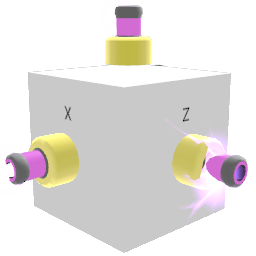
Outputs the block's own X/Y/Z position as jolts. Two modes: 'Ignore rotation' on = absolute world-space coordinates; off = odometer mode that accumulates travelled distance along the block's local axes.
Use the 'Reset' jolt input (or the 'Reset pos. offset' inspector button) to zero out the position. Drop it inside a group/device to read that group's position instead. In odometer mode it acts like a 6-axis trip counter - great for vehicles or for measuring how far something has moved relative to its own facing.
¶ Inputs, Outputs and Parts
¶ Inputs
| Name | Type | Description |
|---|---|---|
| Reset | Jolt Input | Zeroes out the position. In odometer mode this clears the accumulated travel; in absolute mode it sets the current position as the new origin. |
¶ Outputs
| Name | Type | Description |
|---|---|---|
| Output X | Jolt Output | X coordinate of the block (world X when 'Ignore rotation' is on; accumulated local X travel when off). |
| Output Y | Jolt Output | Y coordinate of the block (world Y when 'Ignore rotation' is on; accumulated local Y travel when off). |
| Output Z | Jolt Output | Z coordinate of the block (world Z when 'Ignore rotation' is on; accumulated local Z travel when off). |
¶ Inspector Controls
| Name | Type | Description |
|---|---|---|
| Ignore rotation | checkbox | When enabled (default), outputs absolute world-space coordinates. When disabled, the block acts as an odometer that accumulates travelled distance along its own local axes. |
| Reset pos. offset | button | Resets the offset so the block reports (0, 0, 0) at its current position. |