¶ Toggleboard
Category: 🧠 Logic
¶ Description
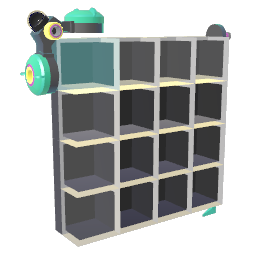
Resizable 2D grid of toggles. Use as a step sequencer, on/off pattern matrix, or addressable boolean memory. Read or write a cell via the Row/Column inputs and the Trigger/Write jolts.
Each cell holds a 0 or 1 state. Drag the resize handle to change the grid dimensions. Select a cell by setting the Row ID and Column ID stream inputs, then fire the Trigger input (or click the trigger button) to emit the stored value, or fire the Write input to overwrite the selected cell with the incoming jolt value. The cell at (Row, Column) highlights in real time as the selection changes.
¶ Inputs, Outputs and Parts
¶ Inputs
| Name | Type | Description |
|---|---|---|
| Row ID | Stream Input | Selects the row to read from or write to (0-indexed). |
| Column ID | Stream Input | Selects the column to read from or write to (0-indexed). |
| Write | Jolt Input | Writes the incoming jolt value into the currently selected cell. |
| Trigger | Jolt Input | Triggers a read: outputs the value of the currently selected cell on the Output. |
¶ Outputs
| Name | Type | Description |
|---|---|---|
| Output value | Jolt Output | Emits the value of the currently selected cell whenever the Trigger input fires. |
¶ Others
| Name | Type | Description |
|---|---|---|
| Resize | Draggable part | Drag this corner to add or remove rows and columns. |
| Trigger | Interactible | Click to manually trigger a read of the currently selected cell. |
¶ Inspector Controls
| Name | Type | Description |
|---|---|---|
| Spacing X | slider | Extra horizontal spacing between cells. |
| Spacing Y | slider | Extra vertical spacing between cells. |
| Arrange in group of | integer | Groups cells together every N items, inserting a small gap between groups. Useful for visually splitting steps (e.g. groups of 4 for a sequencer). |
| Groups Spacing | slider | Extra gap inserted between groups (paired with 'Arrange in group of'). |
| Interaction Type | dropdown | How players activate a toggle: Trigger (click), Touch (hand contact), or None (read-only). |
| Momentary | checkbox | When on, a toggle only stays active while held/pressed (returns to off when released). |
| Allowed Touch Direction | dropdown | Restricts which side(s) of the toggle can be activated by touch: Front only, or Any direction. |
| Colorize | dropdown | Selects which part of each cell takes the block's color: Body (full cell) or Indicator (just the state marker). |
| Hide Body | checkbox | Hides each cell's body so only the state indicator is visible. |
| Lock Size | checkbox | Hides the resize handle so the grid dimensions can no longer be changed by dragging. |