¶ Interaction Box
Category: 🎮 Controllers
¶ Description
A highly flexible interface for building different kinds of interactions.
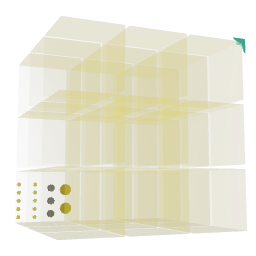
A box-shaped area that can be divided into segments along each axis. Provides a variety of different jolt outputs for each controller inside the interaction area, and lets you control the controller's haptics.
¶ Inputs, Outputs and Parts
¶ Inputs
| Name | Type | Description |
|---|---|---|
| Segments X | Jolt Input with Dial | Controls the number of segments in the X direction. |
| Segments X | Jolt Input | Controls the number of segments in the X direction. |
| Segments Y | Jolt Input with Dial | Controls the number of segments in the Y direction. |
| Segments Y | Jolt Input | Controls the number of segments in the Y direction. |
| Segments Z | Jolt Input with Dial | Controls the number of segments in the Z direction. |
| Segments Z | Jolt Input | Controls the number of segments in the Z direction. |
| Haptics left | Stream Input | Controls the vibration strength of the left controller. |
| Haptics right | Stream Input | Controls the vibration strength of the right controller. |
¶ Outputs
| Name | Type | Description |
|---|---|---|
| Right X | Jolt Output | Emits the X position of the right controller. |
| Right Y | Jolt Output | Emits the Y position of the right controller. |
| Right Z | Jolt Output | Emits the Z position of the right controller. |
| Right present | Jolt Output | Emits a 1 when the right controller enters the area and 0 when it leaves. |
| Right trigger | Jolt Output | Emits a value between 0 and 1 depending on how much the right controller trigger button is pressed. If 'Continous trigger' is turned off via the inspector it sends out 1/0 when the trigger is pressed/released. |
| Left X | Jolt Output | Emits the X position of the left controller. |
| Left Y | Jolt Output | Emits the Y position of the left controller. |
| Left Z | Jolt Output | Emits the Z position of the left controller. |
| Left present | Jolt Output | Emits a 1 when the left controller enters the area and 0 when it leaves. |
| Left trigger | Jolt Output | Emits a value between 0 and 1 depending on how much the left controller trigger button is pressed. If 'Continous trigger' is turned off via the inspector it sends out 1/0 when the trigger is pressed/released. |
¶ Others
| Name | Type | Description |
|---|---|---|
| Resize handle | interactive | Drag to resize the interaction area. |
¶ Inspector Controls
| Name | Type | Description |
|---|---|---|
| Interactible when hidden | checkbox | When enabled, the box still responds to controller input even if the block is hidden. |
| Continous trigger | checkbox | When enabled, the trigger output emits a continuous 0-1 value based on trigger pressure. When disabled it emits a discrete 1 (pressed) or 0 (released). |
| Mouse clickable | checkbox | When enabled, the box can also be clicked using mouse input. |
| Ripples Intensity | slider | Strength of the visual ripple effect emitted when the trigger is pressed. |
| Ripples Size | slider | Size of the visual ripple effect. |
| Transparency | slider | Adjusts the transparency of the box body. |